






 Canada
 China
China Singapore
 Thailand
























Lapland Winter 2026: Finland Northern Lights & eSIM Guide
Picture this: you step off the plane in Rovaniemi, it’s -18°C, your eyelashes frost over in minutes, and the sky is already turning pink at 2 p.m. You need to message your Aurora tour guide, pull up the hotel address, and check the latest Northern Lights forecast—but your home SIM is on airplane mode because roaming would cost a small fortune. That’s exactly where a well-chosen Lapland eSIM turns a magical but stressful arrival into a smooth start to your Arctic adventure. This guide walks you through Lapland winter 2026 planning—from getting there and chasing the Aurora to choosing the best connectivity setup—so you can focus on the snow, not the signal bars.
Finland’s far north is one of those places where preparation really pays off. Distances are long, buses are infrequent, and the weather can flip from clear to blizzard in half an hour. In my own trips to Lapland, I’ve seen travelers stranded at bus stops with no working data, and I’ve also watched others effortlessly rebook tours and navigate snowy streets thanks to a reliable eSIM-based data connection. In the sections below, we’ll dig into concrete winter 2026 tips: how to reach Rovaniemi, Levi, Saariselkä and Inari, how to use eSIM for Finland travel without bill shock, where coverage is strong or patchy, and how to plan your Northern Lights nights like a pro.
Why Lapland in Winter 2026 Is Worth the Extra Planning
Winter 2026 is a particularly exciting time to visit Finnish Lapland because we’re near the peak of the current solar cycle, which usually means more frequent and more intense Northern Lights displays. In practical terms, that gives you a better chance of seeing vivid greens and even occasional purples dancing overhead, especially between January and March. At the same time, Lapland’s tourism infrastructure has grown a lot in the past decade: there are more direct flights, better organized Aurora tours, and more remote cabins with decent 4G coverage than there used to be. The trade-off is that the most popular weeks—especially around New Year and the February school holidays—book up early and get pricey.
Because of that popularity, some things that are spontaneous in other destinations need to be pre-planned here. Husky safaris around Rovaniemi and Levi, for example, often sell out days in advance during peak weeks, and the best glass igloo stays near Saariselkä can be fully booked months ahead. Having fast and reliable Lapland mobile data for tourists lets you monitor availability, compare last-minute options, and grab cancellations quickly. I’ve personally snagged a sold-out snowmobile Aurora tour in Levi because I got a cancellation alert while on a bus, and I could book instantly on my phone.
It’s also worth understanding that Lapland is not just one compact town but a huge region stretching across the Arctic Circle. Rovaniemi is the most famous and easiest to reach, but if your main goal is a serious Northern Lights Finland travel experience, you might want to go further north to places like Saariselkä, Ivalo, or Inari, where nights are darker and light pollution is minimal. Each of these hubs has slightly different connectivity realities: Rovaniemi has strong 4G and increasingly 5G in town, Levi and Ylläs have good coverage in resort areas, while the fells and wilderness areas can drop to 3G or no service. This is where choosing the best eSIM for Lapland, with access to multiple Finnish networks, becomes more than a tech decision—it shapes how independently you can travel.
Another reason to plan carefully for winter 2026 is the climate itself. Cold snaps to -25°C or below are not unusual in January and February, and your phone battery will drain much faster in those conditions. In my experience, a fully charged iPhone that lasts all day in Rome can drop from 80% to 20% in a couple of hours during a Lapland night photo session. That makes it even more important that your connectivity setup is simple and robust: you don’t want to be fiddling with SIM trays in a snowstorm or trying to top up a local SIM in a village kiosk that closes at 5 p.m. A preloaded Finland winter travel eSIM that activates automatically when you land is one less thing to worry about when your fingers are going numb.
Getting to Lapland and Moving Around in the Arctic
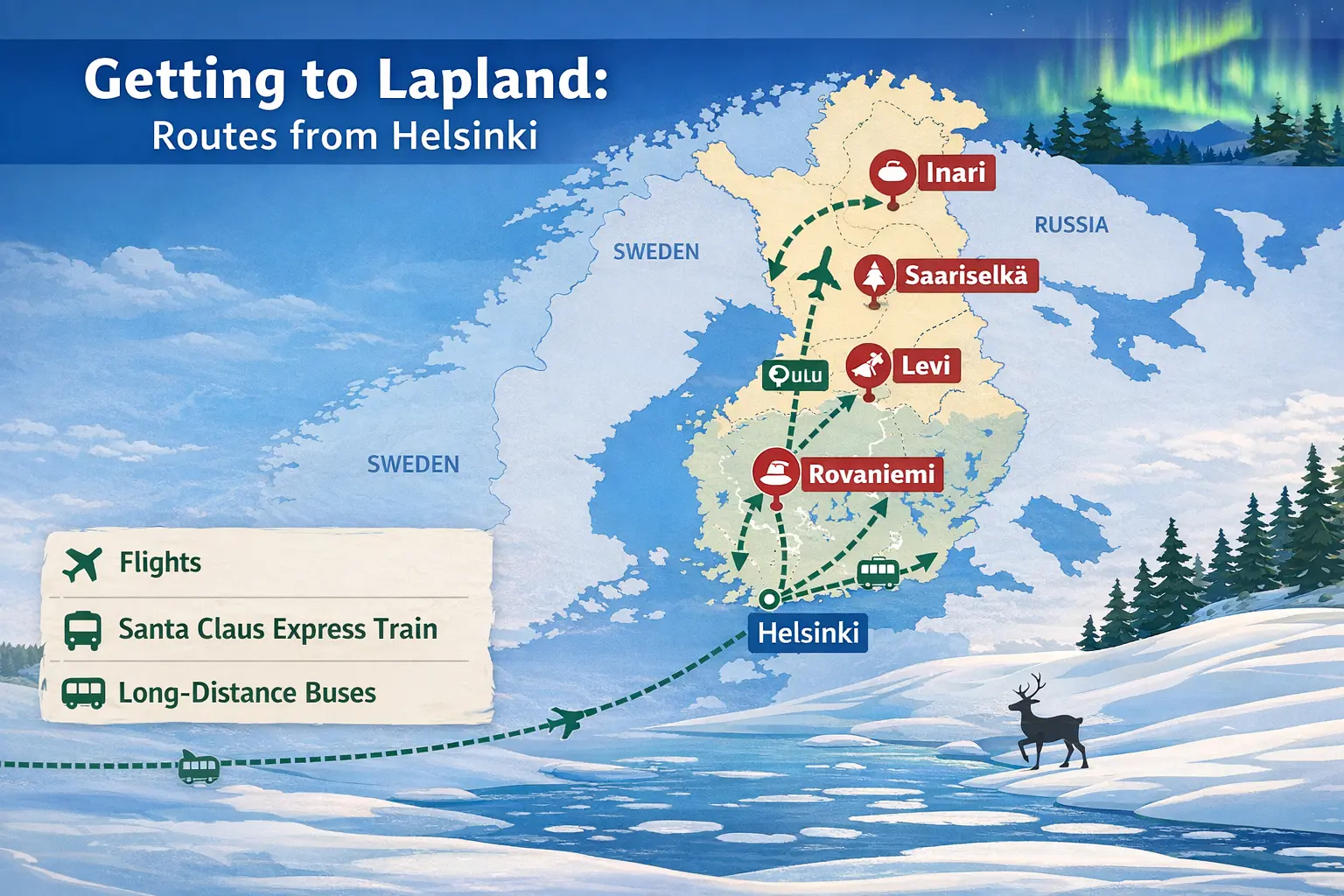
Most travelers start their Lapland journey by flying into Helsinki and then connecting to Rovaniemi, Ivalo, or Kittilä. Finnair and Norwegian typically run several daily flights on these routes in winter, and you’ll often see extra seasonal services around Christmas. If you’re coming from elsewhere in Europe, you might also find direct winter charters to Rovaniemi or Kittilä from the UK, Germany, or France. It’s worth checking those if you’re already planning a European winter break with an eSIM set up for France, because you can then switch to your Finland eSIM when you land in Helsinki or Lapland itself.
For a slower but very atmospheric approach, many people take the overnight Santa Claus Express train from Helsinki to Rovaniemi or even further north to Kemijärvi. The train has sleeper cabins, a restaurant car, and reasonably good mobile coverage for much of the route, especially south of Oulu. I’ve worked online for hours on that train using an eSIM connection, though there are a few dead patches as you get further into the north. If you’re relying on maps or offline entertainment, download what you need in Helsinki before boarding. Once you’re in Lapland, long-distance buses (like Matkahuolto services) connect Rovaniemi with Levi, Ylläsjärvi, Saariselkä, and Ivalo, but frequencies are limited—often just a few buses per day.
Within the main resort towns, you can usually walk or use local ski buses, which are well-timed for slopes and major hotels. Taxis exist but can be expensive, especially at night or in remote spots; a short 10-minute ride in Levi can easily cost €20–€25. This is where having steady mobile data in Lapland Finland is surprisingly important: you’ll want to check real-time bus schedules, call a taxi via app or phone, or even coordinate pickup with your Aurora tour guide if you get delayed. In one January trip, my group missed the last ski bus back from Ylläs to our cabin area; because I had a working data connection, I could look up a local taxi number and share our live location, avoiding a very cold 5 km walk in the dark.
If you’re comfortable driving on snow and ice, renting a car in Rovaniemi, Kittilä, or Ivalo gives you the most flexibility for chasing clear skies. Finnish roads are generally well-maintained, and rental cars come with proper winter tires. However, you must keep in mind that distances are deceptive on the map, and a “quick” 120 km drive can still take two hours in snowy conditions. You’ll also want constant access to navigation, weather, and road condition updates, which is much easier with a stable Finland data plan for travelers than with patchy hotel Wi-Fi. I usually download offline maps on Google Maps as a backup, but I still rely on live data to reroute around accidents or heavy snowfall.
For those staying mainly in one resort like Levi or Saariselkä, you can get by with transfers plus local buses and tours. Just be aware that once you’re out on a snowmobile trail or deep in a forest on a husky safari, mobile coverage may drop out entirely for stretches, regardless of which SIM you’re using. That’s normal and part of being in genuine wilderness. The important thing is having connectivity when it counts: booking those tours, confirming pickup times, receiving last-minute weather alerts, and navigating between your accommodation, ski lifts, and activity centers.
Staying Connected in Lapland: Local SIM vs Lapland eSIM vs Roaming
Finland has three main mobile operators with strong national networks: Elisa, Telia, and DNA. In southern Finland and bigger Lapland towns like Rovaniemi, you’ll see extensive 4G and growing 5G coverage, while more remote fells and lake areas may fall back to 3G or lose service entirely. For travelers, the main options for staying connected are: using expensive roaming from your home provider, buying a local physical SIM after arrival, or setting up a dedicated eSIM for Finland travel before you leave. Each has its place, but in winter Lapland, the hassle factor really matters.
Roaming with your home SIM is technically the easiest—no setup, your number stays the same—but it’s almost always the most expensive and least predictable. I’ve seen friends burn through a 2 GB “travel pass” in a single night of uploading Aurora photos and video, then get throttled to unusable speeds for the rest of their trip. Outside the EU, per-megabyte roaming can be brutal; even within Europe, some non-EU carriers cap “fair use” at low data levels. If you’re used to generous data at home, it’s easy to underestimate how quickly you’ll chew through data when you’re constantly checking Aurora forecasts, maps, WhatsApp, and Instagram Stories from your glass igloo.
Buying a local SIM from Elisa or DNA in Rovaniemi is a solid option if you’re staying longer and don’t mind finding a store. Prepaid packages might run around €19–€30 for unlimited domestic data for 7–14 days, sometimes with speed caps. The downside is logistics: you need to locate a store that’s open when you arrive, show ID, and physically swap SIMs, which means you temporarily lose access to your home number for SMS verification codes. That’s not ideal when you’re trying to log into banking apps or receive two-factor codes for your email. It’s even more annoying if you land late at night and everything’s closed, leaving you without data until the next day.
A dedicated Lapland eSIM, like the Finland winter travel eSIM plans EasyAlo offers, solves most of those headaches. You can scan a QR code at home, install the eSIM profile in advance, and it will automatically connect to a supported Finnish network when you land—no hunting for kiosks or fiddling with SIM trays in the cold. Because eSIMs are data-only, you keep your physical SIM in the phone for calls and SMS if needed, using data-based apps like WhatsApp or FaceTime for most communication. If you’re unsure about setup, EasyAlo’s step-by-step guides are similar in style to their detailed iPhone eSIM activation tutorial, so you’re not left guessing.
In terms of cost, a Finland eSIM vs roaming for Lapland winter travel is usually not even a close contest. A typical short-trip eSIM might offer 5–10 GB of high-speed data for a fixed price that’s often 40–70% cheaper than what many non-EU carriers charge for the same amount via roaming passes. The more you actually use your phone—uploading photos, checking maps hourly, streaming a bit of Netflix in your cabin—the more that price difference widens. And if something goes wrong, like your eSIM not connecting on the first try, having access to a clear eSIM troubleshooting guide is much more reassuring than trying to get through to a roaming hotline back home while standing outside Rovaniemi Airport.
Choosing the Best eSIM for Lapland and How Much Data You Need
When you’re picking the best eSIM for Lapland Northern Lights trip planning, there are a few key factors that matter more than flashy marketing: network partners in Finland, data allowance, validity period, and whether tethering (hotspot) is allowed. For Lapland specifically, you want an eSIM that can connect to at least one of the big three Finnish operators (Elisa, Telia, DNA), because they collectively provide the broadest coverage across the north. Many reputable providers, including EasyAlo, partner with multiple networks so your phone can latch onto whichever has the strongest signal in your area.
As for how much mobile data you need in Lapland in winter, it depends on your habits, but I can give you realistic ranges based on actual trips. On a 5-day Northern Lights Finland travel itinerary where you’re mostly using maps, messaging, Aurora forecast apps, and some social media posting, 5 GB is usually comfortable if you’re not streaming video. If you add in a bit of Netflix or YouTube at night, or you’re backing up high-res photos to the cloud, you’ll be happier with 10–15 GB. For a 10-day trip with regular social sharing and some remote work, I’d personally go for at least 15–20 GB to avoid constantly checking your usage.
One counterintuitive tip: in Lapland, you may actually use more data on “bad weather” days than on clear Aurora nights. When it’s cloudy or stormy, you’re more likely to stay indoors, scroll more, video call family from your cabin, or stream something in the evening. On clear nights, you’re outside watching the sky instead of your phone. So don’t underestimate your total usage just because your main goal is an outdoor natural phenomenon. I’ve had trips where my largest data spikes were during whiteout days when I was stuck inside a Rovaniemi café for hours, working and streaming music.
Before you buy, check whether your plan includes hotspot sharing, especially if you’re traveling as a couple or group. It can be much simpler for one person to buy a generous Finland data plan for travelers and share it with a partner’s phone or a laptop, rather than juggling multiple plans. Also verify the validity window: some eSIMs count days from activation, others from first connection, and some have fixed calendar windows. For a winter 2026 trip that might span New Year or school holidays, you want to be sure your plan covers your full dates. If you’re combining Lapland with a stopover in another country, you might prefer a broader European package similar to EasyAlo’s regional offerings for places like their Germany Christmas market eSIM guide, then switch to a Finland-specific plan for your Arctic leg.
Installation is straightforward on most recent phones. You’ll typically receive a QR code after purchase, then on iOS you go to Settings → Mobile Data → Add eSIM, and scan it. On Android, the path varies slightly by brand, but the concept is the same. The important part is to install it while you still have a stable Wi-Fi connection at home or at your departure airport. That way, if there’s any issue, you can quickly re-scan, re-download, or contact support without already being in the Arctic Circle. Once it’s installed, you can leave it “off” until you land, then toggle it on and set it as your data line while keeping your physical SIM active for calls and texts.
Top Things to Do in Lapland: Beyond Just the Northern Lights
Most people come to Lapland dreaming of the Aurora, but what makes the trip unforgettable is everything you do while you’re waiting for the sky to light up. In and around Rovaniemi, you’ve got Santa Claus Village on the Arctic Circle, where you can meet the man in red, cross the official Arctic Circle line, and send postcards stamped with a special Arctic postmark. It’s touristy, yes, but if you lean into the experience, it’s fun—especially if you coordinate times and tickets online using your eSIM for Finland travel instead of standing in long queues without a plan.
Further north, Levi and Ylläs are all about skiing, snowboarding, and winter sports. Levi has around 40 slopes and 27 lifts, plus a compact village full of restaurants and bars. Ylläs is a bit quieter but has longer runs and a more “wilderness” feel. In both places, you can book husky safaris, reindeer sleigh rides, and snowshoe hikes. Many of these tours use WhatsApp or SMS to confirm pickup times and locations, which is where having a functioning Lapland eSIM is genuinely practical. I’ve had a guide change our meeting point at the last minute due to icy roads; without data, I would have been waiting in the wrong spot.
If you’re heading to Saariselkä, Ivalo, or Inari, you’re entering some of Lapland’s most beautiful, less crowded landscapes. Saariselkä sits near Urho Kekkonen National Park, where you can snowshoe among silent, snow-laden trees and chase the Aurora on open fells with minimal light pollution. Inari has a strong Sámi cultural presence, and visiting the Siida Museum is one of the most meaningful ways to understand the region’s Indigenous history and relationship to the land. In these smaller communities, restaurants and shops often have shorter opening hours, especially on Sundays, so it’s smart to check Google Maps and local websites for hours using your Finland data plan rather than assuming something will be open when you arrive.
Of course, the headline experience remains the Northern Lights. Many travelers book guided tours in minibuses, snowmobiles, or even reindeer sleds. The advantage of a tour is that guides read weather models, cloud cover maps, and solar activity charts, then drive you to locations with the best chances that night. Still, it’s incredibly helpful to have your own phone data to follow apps like Aurora Forecast, My Aurora Forecast, or even the Finnish Meteorological Institute’s cloud cover maps. On one February trip, our tour company moved departure an hour earlier because a cloud front was approaching; they sent updates by email and WhatsApp, and I saw them immediately thanks to my eSIM. Several people who were relying on patchy hotel Wi-Fi missed the message and nearly missed the bus.
Don’t forget the quieter pleasures: sitting in a riverside kota (wooden hut) grilling sausages over an open fire, warming up in a lakeside sauna after a day on the trails, or simply walking through Rovaniemi’s Ounasvaara forests in the blue twilight of kaamos (polar night). These are the moments when you might actually want to put your phone on airplane mode and just be present. But it’s comforting to know that, as soon as you’re ready to share that pink-and-blue sky with friends back home, your Lapland mobile data for tourists is there waiting, without you having to hunt for a café with working Wi-Fi.
Practical Lapland Tips: Weather, Culture, and Everyday Survival
Lapland in winter is stunning, but it’s not a place where you want to improvise your clothing or daily routines. Temperatures can swing from a mild -5°C to a biting -30°C in the same week, and wind chill on an exposed fell makes it feel even colder. The key is layering: a moisture-wicking base layer, warm mid-layer (like fleece or wool), and a windproof, insulated outer layer. Waterproof boots with proper grip are essential if you’re walking on icy streets in Rovaniemi or Levi. When you’re checking weather apps on your phone, remember that the “feels like” temperature is the one that matters when you’re standing still waiting for the Aurora at midnight.
One detail many first-timers miss is how quickly phone batteries die in the cold. I always keep my phone in an inner pocket close to my body and use a short cable to connect to a power bank in another pocket. If you’re relying on your phone for maps, Aurora forecasts, and eSIM connectivity, treat it like critical gear, not just a camera. Download offline maps of Rovaniemi, Levi, or whichever area you’re staying in, just in case you hit a dead zone or your data plan temporarily runs out. This is the same habit that helps on other winter trips, like using a strong local data plan to avoid roaming charges on a ski trip to France—something EasyAlo covers in depth in their France ski roaming guide.
Culturally, Finland is straightforward and low-drama. People are generally reserved but very helpful if you ask specific questions. Almost everyone in tourism speaks excellent English, so language is rarely a barrier. Still, it’s polite to learn a few basics like “kiitos” (thank you) and “moi” (hi). Tipping is not expected in the same way as in North America; service is usually included in prices, though rounding up or leaving a euro or two for great service is appreciated. When you’re paying, most places accept contactless cards and mobile payments, but it’s wise to carry a small amount of cash for remote cabins or roadside cafés where card terminals might struggle if the connection drops.
In terms of safety, Lapland is one of the safer regions you’ll ever visit, but the environment demands respect. Stick to marked trails, listen carefully to instructions on snowmobile or husky tours, and don’t wander onto frozen rivers or lakes unless a guide confirms they’re safe. If you’re self-driving, keep your fuel tank at least half full, as distances between petrol stations can be long. It’s also smart to share your plans with your accommodation or travel partner and keep your phone charged so you can call for help if needed. An active Finland winter travel eSIM can be a genuine safety tool, not just a convenience, especially if your rental car breaks down on a quiet road at -20°C.
One more practical point: daylight. In deep winter, especially around the December solstice, you might only get 3–4 hours of real daylight in places like Saariselkä or Inari. That means your daytime activities, like skiing or dog sledding, are tightly packed into a short window. Use your phone calendar and alarms to keep track, and check opening hours carefully with your data connection. It’s surprisingly easy to lose track of time when it’s been twilight for hours, then discover the supermarket closes at 7 p.m. and you’re still in your thermal underwear at the cabin.
Best Time to Visit Lapland for Northern Lights in Winter 2026
While the Northern Lights can appear anytime from late August to early April, the sweet spot for a Lapland winter 2026 Northern Lights travel guide is usually from mid-January to mid-March. By then, the polar night period is ending, so you get more usable daylight for activities, but it’s still dark enough at night for good Aurora viewing. Statistically, clear skies are more frequent in March than in December, and temperatures—while still cold—can be a bit more manageable. If your schedule is flexible and your main goal is the Aurora rather than Christmas vibes, late February to mid-March is often the best compromise.
December, especially the weeks around Christmas and New Year, is peak season for Rovaniemi and Santa-themed trips. The atmosphere is magical: Christmas lights, snow-covered trees, and lots of family-friendly activities. The flip side is higher prices, more crowds, and a lower chance of multiple clear nights in a row. If you come then, book accommodation, key tours, and your Lapland eSIM well in advance. I’ve seen travelers arrive in late December without pre-booked data or tours and spend their first day running around town trying to sort everything out instead of enjoying the snow.
January is colder and quieter, with better availability and often lower prices. The deep cold can be intense, but it also brings very crisp, clear nights when the Aurora really pops. You’ll want a rock-solid connectivity setup then, because you won’t want to linger outside longer than needed to check maps or weather. February brings school holidays in several European countries, so ski resorts like Levi and Ylläs get busy again. If you’re coming from places like the UK, you might already be used to traveling with a regional European eSIM—similar to how travelers heading to the Alps or even further afield to Asia might prepare with a Korea eSIM guide or other regional resources before they fly.
Another angle to consider is the solar cycle. We’re near a solar maximum around 2024–2026, which generally means more geomagnetic activity and more frequent Auroras. That doesn’t guarantee a show on any given night—clouds can still ruin the party—but it does tilt the odds in your favor over a week-long trip. A smart strategy is to stay at least four or five nights in the Aurora zone, giving yourself multiple chances. Use your eSIM connection to monitor KP index forecasts (a measure of geomagnetic activity), local cloud cover predictions, and alerts from your tour operators. When you see a promising combination of clear skies and a rising KP index, be ready to head out, even if it’s a bit later than you planned.
Finally, think about your personal tolerance for cold and darkness. If you know you struggle with very short days, aim for March, when Lapland starts to feel more like a bright winter wonderland than an endless night. If you love the idea of deep blue twilight and stars at 3 p.m., January might be your month. In all cases, having a reliable Finland eSIM for Lapland gives you the flexibility to adapt your plans in real time—switching Aurora nights, rebooking tours, or deciding to take a rest day when the forecast looks poor.
Making the Most of Your Lapland eSIM: Usage Tips and Edge Cases
Once your eSIM is installed and active, a few simple habits will make it work harder for you. First, set your eSIM as the default line for mobile data, but keep your physical SIM active for calls and SMS. In your phone’s settings, you can usually choose which line handles data and which handles voice. This way, you avoid roaming charges for data while still being reachable on your regular number if needed. If your home carrier charges for incoming calls abroad, you can even set your physical SIM to “no data” and “no roaming” to be safe, relying entirely on apps like WhatsApp, Signal, or FaceTime Audio for communication.
Second, manage background data use. Many apps quietly sync photos, update feeds, or download large files in the background, which can eat into your data allowance. Before your trip, go through your phone’s settings and restrict background data for heavy apps like cloud backups or streaming platforms. You can also download playlists and series episodes over Wi-Fi at your hotel to save mobile data. This is the same principle travelers use in other data-hungry destinations, whether they’re preparing a Spain eSIM for city-hopping or planning long train rides across Asia.
Third, think about redundancy. Even with a good eSIM, there will be spots in Lapland with no coverage due to terrain or remoteness. Download offline maps, save key addresses and booking confirmations in a notes app, and take screenshots of QR codes for tours or train tickets. If your eSIM ever fails to connect after landing—rare, but it happens—the usual quick fixes are: toggling airplane mode, manually selecting a supported network in your phone’s carrier settings, and restarting the device. If those don’t work, customer support from a provider like EasyAlo is typically responsive, and having Wi-Fi at the airport or hotel lets you contact them easily.
For edge cases, consider dual-country or multi-leg trips. If you’re flying into another European country first—say, spending a few days in Italy with an Italy-focused eSIM package—and then heading to Lapland, you’ll want to plan how you’ll switch between eSIM profiles. Most modern phones let you store multiple eSIMs and toggle them on or off as needed. Label them clearly (e.g., “Italy data” and “Finland Lapland”) so you don’t accidentally burn data on the wrong plan. And if you’re traveling with kids or less tech-savvy relatives, consider being the “connectivity captain” for the group: buy a larger data package and share it via hotspot so everyone can check maps and messages without managing their own plans.
Finally, remember that eSIMs are not magic wands. They can’t conjure a signal where no tower exists, and they don’t override the laws of physics that make 5G slower in heavy snow. But compared to juggling physical SIM cards or gambling on home roaming, they give you a level of control and predictability that’s incredibly valuable in a remote, weather-dependent destination like Lapland. When your Aurora alert pings at 10:45 p.m., your tour gets moved due to incoming clouds, or you realize you’ve taken a wrong turn down an unlit side road, you’ll be glad your phone connects instantly rather than spinning on “No Service.”
Conclusion: A Connected, Stress-Free Lapland Winter 2026
Lapland in winter 2026 offers that rare combination of raw nature, reliable infrastructure, and a genuine sense of magic—especially on nights when the Northern Lights ripple across the sky. But the same remoteness that makes it special also makes it unforgiving if you arrive unprepared. Flights are limited, buses don’t run every hour, and a missed message from your tour operator can mean missing your best Aurora opportunity. That’s why thinking through your connectivity plan isn’t a minor detail; it’s part of how you protect your time and money on this trip.
Choosing a solid Lapland eSIM before you leave means you land in Helsinki or Rovaniemi with working data from the moment you turn off airplane mode. You can message your accommodation, check the weather, verify bus times, and pull up that all-important Aurora forecast without hunting for a SIM kiosk or fighting with airport Wi-Fi. Compared with unpredictable roaming or last-minute local SIM shopping in sub-zero temperatures, a pre-installed eSIM for Finland travel is simply the most practical option for most visitors.
As you fine-tune your winter 2026 plans—picking between Rovaniemi’s Santa charm, Levi’s ski slopes, or Inari’s deep quiet—treat connectivity as part of your safety kit, not just a way to post photos. Decide how much data you realistically need, install your eSIM while you’re still at home, and back it up with offline maps and a power bank. Then, once you’re in Lapland, let the tech fade into the background and focus on the crunch of snow under your boots, the hiss of the sauna stove, and that first moment when a faint green arc appears above the trees.
If you get the basics right—warm layers, flexible itinerary, and a reliable Finland winter travel eSIM—you’ll give yourself the best possible chance of coming home with what really matters: clear memories of an Arctic sky that suddenly came alive.